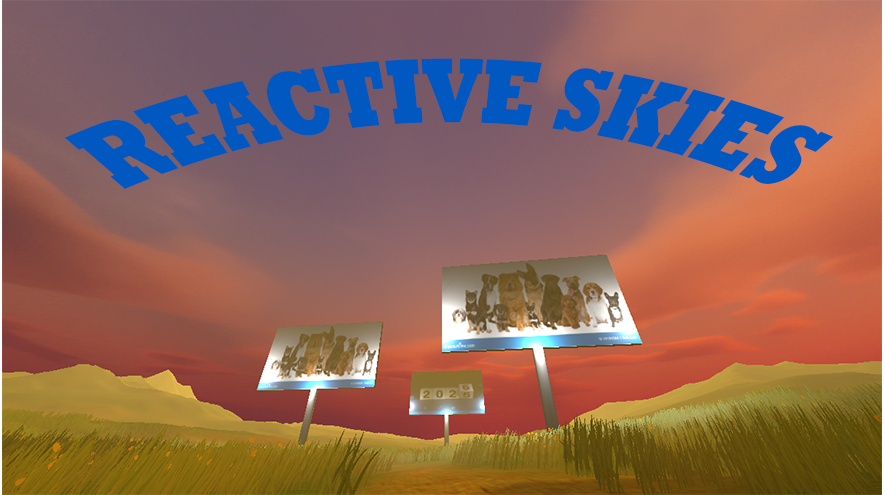
Reactive Skies
Real-Time Weather Integration & Cloud Services Playground
Project Overview
Reactive Skies began as a class lab project focused on API integration and cloud services, but has since evolved into my personal experimental playground for testing unfamiliar Unity features. The project demonstrates real-time weather data integration using the OpenWeatherMap API, user authentication through PlayFab, and optimized data caching strategies. It's become my go-to sandbox for exploring new APIs, testing backend services, and prototyping network features before implementing them in larger projects.
Technical Highlights
Real-Time Weather API
OpenWeatherMap integration with dynamic skybox switching
PlayFab Authentication
Email and device-based login with persistent sessions
Smart Caching System
Local storage optimization for images and data
XML Parsing
API response handling with error management
Dynamic Lighting
Time-based lighting adjustments from sunrise/sunset data
Dynamic Lighting
Time-based lighting adjustments from sunrise/sunset data
Screenshot Utility
Timestamped screenshot capture system
Code Showcase
Dynamic Weather System with API Integration
The WeatherManager pulls live weather data from OpenWeatherMap's API, parses XML responses, and dynamically adjusts the game's skybox and lighting based on real-world conditions. The system calculates dawn/dusk periods using actual sunrise/sunset times and applies appropriate atmospheric effects. This was my first deep dive into REST API integration!
WeatherManager.cs - API Integration & Dynamic Environment
using System;
using System.Collections;
using System. Xml.Linq;
using UnityEngine;
using UnityEngine.Networking;

public class WeatherManager : MonoBehaviour
{
    public string location = "Orlando,us";
    public Material clearDawnSkyboxMaterial;
    public Material clearDaySkyboxMaterial;
    public Material clearDuskSkyboxMaterial;
    public Material clearNightSkyboxMaterial;
    public Material rainSkyboxMaterial;
    public Material snowSkyboxMaterial;
    public Light directionalLight;
    public float dawnDuskMargin;

    private enum TimeOfDay { Dawn, Day, Dusk, Night }
    private TimeOfDay currentTimeOfDay;
    private string xmlApi => "http://api.openweathermap.org/data/2.5/weather?q=" +
                             location + "&mode=xml&appid=dc349e3935101abb942e111db21c2985";

    // Generic API call wrapper with error handling
    private IEnumerator CallAPI(string url, Action callback)
    {
        using (UnityWebRequest request = UnityWebRequest.Get(url))
        {
            yield return request.SendWebRequest();
            if (request.result == UnityWebRequest.Result.ConnectionError)
            {
                Debug.LogError($"network problem: {request.error}");
            }
            else if (request.result == UnityWebRequest. Result. ProtocolError)
            {
                Debug.LogError($"response error: {request.responseCode}");
            }
            else
            {
                callback(XDocument.Parse(request.downloadHandler.text));
            }
        }
    }

    public IEnumerator GetWeatherXML(Action callback)
    {
        return CallAPI(xmlApi, callback);
    }

    void Start()
    {
        directionalLight.color = Color.white;
        directionalLight.intensity = 1. 0f;
        RenderSettings.skybox = clearDaySkyboxMaterial;
        StartCoroutine(GetWeatherXML(OnXMLDataLoaded));
    }

    public void OnXMLDataLoaded(XDocument data)
    {
        Debug.Log(data);

        if (data. Root. Element("city") != null)
        {
            Debug.Log("Successfully retrieved weather data for " +
                     data.Root.Element("city").Attribute("name").Value);
        }

        DateTime now = DateTime.Now;

        // Parse sunrise/sunset times from API
        XElement sun = data.Root.Element("city").Element("sun");
        DateTime sunrise = DateTime.Parse(sun. Attribute("rise").Value).ToLocalTime();
        DateTime sunset = DateTime.Parse(sun.Attribute("set").Value).ToLocalTime();

        // Determine time of day with margin for dawn/dusk
        if (now < sunrise. AddMinutes(-dawnDuskMargin) || now > sunset.AddMinutes(dawnDuskMargin))
        {
            Debug.Log("It's night time.");
            directionalLight.intensity = 1.3f;
            directionalLight.color = new Color32(55, 95, 135, 255);
            currentTimeOfDay = TimeOfDay. Night;
        }
        else if (now >= sunrise.AddMinutes(-dawnDuskMargin) && now <= sunrise.AddMinutes(dawnDuskMargin))
        {
            Debug.Log("It's dawn.");
            directionalLight.intensity = 1.2f;
            directionalLight. color = new Color32(255, 222, 50, 255);
            currentTimeOfDay = TimeOfDay.Dawn;
        }
        else if (now >= sunset.AddMinutes(-dawnDuskMargin) && now <= sunset.AddMinutes(dawnDuskMargin))
        {
            Debug.Log("It's dusk.");
            directionalLight.intensity = 1.6f;
            directionalLight. color = new Color32(254, 180, 32, 255);
            currentTimeOfDay = TimeOfDay. Dusk;
        }
        else
        {
            Debug. Log("It's daytime.");
            directionalLight. intensity = 1.25f;
            directionalLight. color = new Color32(255, 255, 224, 255);
            currentTimeOfDay = TimeOfDay.Day;
        }

        // Apply appropriate skybox based on time of day
        switch (currentTimeOfDay)
        {
            case TimeOfDay. Dawn:
                RenderSettings. skybox = clearDawnSkyboxMaterial;
                break;
            case TimeOfDay.Day:
                RenderSettings.skybox = clearDaySkyboxMaterial;
                break;
            case TimeOfDay.Dusk:
                RenderSettings. skybox = clearDuskSkyboxMaterial;
                break;
            case TimeOfDay.Night:
                RenderSettings.skybox = clearNightSkyboxMaterial;
                break;
        }

        // Check for precipitation and override skybox
        XElement weather = data.Root.Element("precipitation");
        if (weather != null)
        {
            switch (weather.Attribute("mode").Value)
            {
                case "rain":
                    Debug.Log("It's raining!");
                    RenderSettings.skybox = rainSkyboxMaterial;
                    break;
                case "snow":
                    Debug.Log("It's snowing!");
                    RenderSettings.skybox = snowSkyboxMaterial;
                    break;
                default:
                    Debug.Log("No precipitation.");
                    break;
            }
        }
    }
}
PlayFab Authentication System
Implemented a flexible authentication system supporting multiple login methods (email, device ID) through the Strategy pattern. The system includes persistent login sessions, automatic re-authentication, and credential storage handled by PlayFab. This was my introduction to backend-as-a-service (BaaS) platforms!
ILogin.cs - Authentication Interface
using PlayFab.ClientModels;
using PlayFab;

// Strategy pattern interface for multiple login methods
public interface ILogin
{
    void Login(System.Action onSuccess, System.Action onError);
}
PlayFabManager.cs - Authentication Manager
using PlayFab. ClientModels;
using PlayFab;
using UnityEngine;

public class PlayFabManager : MonoBehaviour
{
    private LoginManager loginManager;
    private string savedEmailKey = "SavedEmail";
    private string userEmail;

    private void Start()
    {
        loginManager = new LoginManager();

        // Auto-login if credentials are saved
        if (PlayerPrefs.HasKey(savedEmailKey))
        {
            string savedEmail = PlayerPrefs.GetString(savedEmailKey);
            EmailLoginButtonClicked(savedEmail, "SavedPassword");
        }
    }

    public void EmailLoginButtonClicked(string email, string password)
    {
        userEmail = email;
        loginManager.SetLoginMethod(new EmailLogin(email, password));
        loginManager.Login(OnLoginSuccess, OnLoginFailure);
    }

    public void OnLoginSuccess(LoginResult result)
    {
        Debug. Log("Login successful!");

        // Persist email for future auto-login
        if (! string.IsNullOrEmpty(userEmail))
            PlayerPrefs.SetString(savedEmailKey, userEmail);

        LoadPlayerData(result.PlayFabId);
    }

    public void OnLoginFailure(PlayFabError error)
    {
        Debug.LogError("Login failed: " + error.ErrorMessage);
    }

    private void LoadPlayerData(string playFabId)
    {
        var request = new GetUserDataRequest
        {
            PlayFabId = playFabId
        };
        PlayFabClientAPI.GetUserData(request, OnDataSuccess, OnDataFailure);
    }

    private void OnDataSuccess(GetUserDataResult result)
    {
        // Load Player
        Debug.Log("Player data loaded successfully.");
    }

    private void OnDataFailure(PlayFabError error)
    {
        Debug.LogError("Failed to load player data: " + error.ErrorMessage);
    }
}
EmailLogin.cs - Email Authentication Strategy
using PlayFab.ClientModels;
using PlayFab;

public class EmailLogin : ILogin
{
    public string Email { get; private set; }
    public string Password { get; private set; }

    public EmailLogin(string email, string password)
    {
        Email = email;
        Password = password;
    }

    public void Login(System.Action onSuccess, System.Action onError)
    {
        var request = new LoginWithEmailAddressRequest
        {
            Email = Email,
            Password = Password
        };
        PlayFabClientAPI.LoginWithEmailAddress(request, onSuccess, onError);
    }
}
DeviceLogin.cs - Device ID Authentication Strategy
using PlayFab. ClientModels;
using PlayFab;
using UnityEngine. iOS;

public class DeviceLogin :  ILogin
{
    private string deviceID;

    public DeviceLogin()
    {
        deviceID = Device.vendorIdentifier;
    }

    public void Login(System.Action onSuccess, System.Action onError)
    {
        var request = new LoginWithCustomIDRequest
        {
            CustomId = deviceID,
            CreateAccount = true  // Auto-create account on first login
        };
        PlayFabClientAPI.LoginWithCustomID(request, onSuccess, onError);
    }
}
Smart Image Caching System
Developed an optimized image loading system that caches downloaded images locally to reduce bandwidth and improve load times. The system downloads images from URLs on first access, stores them persistently, and retrieves from cache on subsequent loads. Includes cache management for clearing old data.
BillboardImagePicker.cs - Cached Image Loading
using System;
using System.Collections;
using System.IO;
using UnityEngine;
using UnityEngine. Networking;

public class BillboardImagePicker : MonoBehaviour
{
    public string billboardID;
    public string[] imageUrls;

    private string localPath;
    private Renderer billboardRenderer;

    void Start()
    {
        billboardRenderer = GetComponent();
        int randomIndex = UnityEngine.Random.Range(0, imageUrls.Length);
        Debug.Log("Selected image URL: " + imageUrls[randomIndex]);

        // Generate cache path with unique identifier
        localPath = Application.persistentDataPath + "/" + billboardID + "_" + randomIndex + ".png";
        StartCoroutine(LoadImageFromURL(imageUrls[randomIndex], ApplyTexture));
    }

    private IEnumerator LoadImageFromURL(string url, Action callback)
    {
        byte[] imageData;

        // Check if image is already cached
        if (! File.Exists(localPath))
        {
            // Download and cache image
            UnityWebRequest request = UnityWebRequestTexture.GetTexture(url);
            yield return request. SendWebRequest();
            Debug.Log("Downloading image from URL: " + url);

            imageData = DownloadHandlerTexture.GetContent(request).EncodeToPNG();
            File.WriteAllBytes(localPath, imageData);
        }
        else
        {
            // Load from cache
            Debug.Log("Loading image from cache: " + localPath);
            imageData = File.ReadAllBytes(localPath);
        }

        // Convert byte array to texture
        Texture2D texture = new Texture2D(2, 2);
        texture.LoadImage(imageData);
        callback(texture);
    }

    private void ApplyTexture(Texture2D texture)
    {
        billboardRenderer.material. mainTexture = texture;
    }

    public void ClearCachedImage()
    {
        // Clean up all cached images for this billboard
        for (int i = 0; i < imageUrls.Length; i++)
        {
            string path = Application.persistentDataPath + "/" + billboardID + "_" + i + ".png";
            if (File.Exists(path))
            {
                File.Delete(path);
                Debug.Log("Deleted cached image at: " + path);
            }
        }
    }
}
Screenshot Capture Utility
Simple but effective screenshot tool with timestamped filenames. Perfect for capturing different weather conditions during testing and creating portfolio content!
ScreenshotTool.cs - Timestamped Screenshot System
using System;
using UnityEngine;

public class ScreenshotTool : MonoBehaviour
{
    public void TakeScreenshot()
    {
        // Generate timestamped filename
        string timestamp = DateTime.Now.ToString("yyyyMMdd_HHmmss");
        string filename = $"Screenshot_{timestamp}.png";

        ScreenCapture.CaptureScreenshot(filename);
        Debug.Log($"Screenshot saved as {filename}");
    }
}
Learning & Experimentation
API Integration
What I Learned: RESTful API consumption, XML parsing, asynchronous request handling, and error management. OpenWeatherMap taught me how to work with real-time external data sources.
Cloud Services
What I Learned: Backend-as-a-Service platforms, user authentication flows, session management, and cloud data storage. PlayFab became my testing ground for understanding player accounts and persistent data.
Performance Optimization
What I Learned: Local caching strategies, reducing network calls, efficient file I/O, and data persistence. These techniques significantly improved app responsiveness.
Dynamic Environments
What I Learned: Runtime material swapping, procedural skybox switching, dynamic lighting adjustments, and creating reactive game worlds that respond to real-world data.
Developer Reflection
Reactive Skies started as a simple class assignment but quickly became my favorite experimentation space. Every time I want to test a new API, try out a cloud service, or prototype a network feature, I come back to this project. It's taught me that some of the best learning happens when you turn assignments into playgrounds, where mistakes are cheap and creativity flows freely. The weather integration was particularly satisfying; seeing Unity's skybox change to match the actual weather outside my window felt like magic!